# Analytics, User Feedback, and SEO

> Add Google Analytics tracking to your site, collect user feedback and learn about the page description meta tag.

---

## Adding Analytics

The Docsy theme builds upon [Hugo's support for Google Analytics][hugo-ga],
which Hugo provides through [embedded templates][]. Once you set up analytics as
described below, usage information for your site (such as page views) is sent to
your [Google Analytics][] account.

### Prerequisites

You will need an **analytics ID** for your website before proceeding
(technically it's called a measurement ID or property ID but we'll use the term
"analytics ID" in this guide). If you don't have one, see the **How to get
started** section of [Introducing Google Analytics 4 (GA4)][ga4-intro].

> [!TIP]
>
> Your project's **analytics ID** is a string that starts with `G-` (a GA4
> measurement ID) or `UA-` (a universal analytics property ID).

### Setup

Enable Google Analytics by adding your project's analytics ID to the site
configuration file. For details, see [Configure Google Analytics][].

<!-- Remove this warning once the Hugo docs have been updated to include it. -->

> [!WARNING] Deprecation note and warning
>
> While you can configure your project's analytics ID by setting either the
> top-level `googleAnalytics` config parameter or `services.googleAnalytics.id`,
> **`googleAnalytics` was [deprecated in Hugo 0.120.0][v0.120.0]** and will be
> removed in a future release.
>
> **Do not define both parameters,** otherwise this can result in [unexpected
> behavior][#921]. For details, see [Is services.googleAnalytics.id an alias for
> googleAnalytics][alias-discussion].

[alias-discussion]:
  https://discourse.gohugo.io/t/config-is-services-googleanalytics-id-an-alias-for-googleanalytics/39469
[#921]: https://github.com/google/docsy/issues/921
[v0.120.0]: https://github.com/gohugoio/hugo/releases/tag/v0.120.0

> [!NOTE] Production-only feature!
>
> Analytics are enabled _only_ for **production** builds (called "environments"
> in Hugo terminology). For information about Hugo environments and how to set
> them, see the following [discussion][].

[discussion]:
  https://discourse.gohugo.io/t/what-does-setting-hugo-env-to-production-do/24669/2

## User Feedback

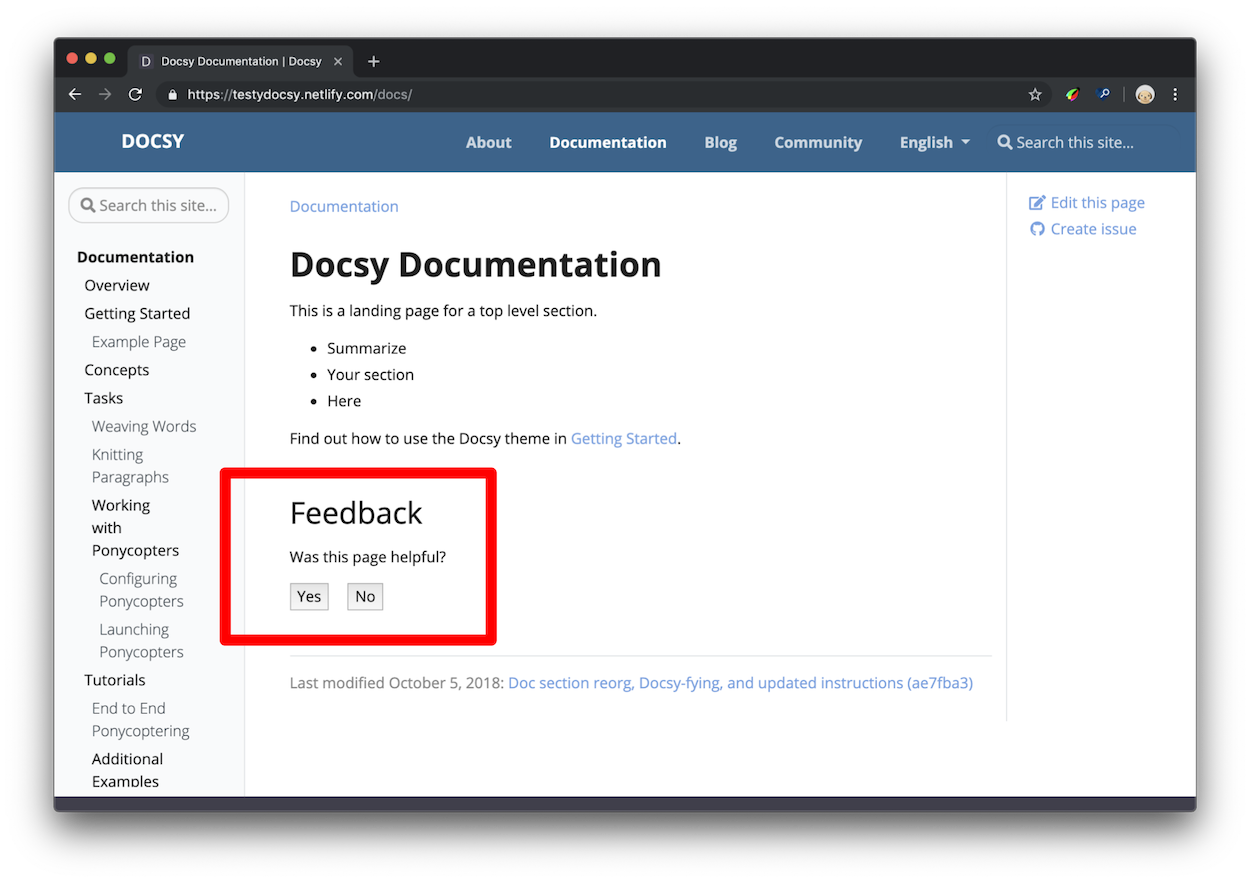
By default Docsy puts a "was this page helpful?" feedback widget at the bottom
of every documentation page, as shown in Figure 1.

<figure>
  <img src="/images/feedback.png"
       alt="The user is presented with the text 'Was this page helpful?' followed
            by 'Yes' and 'No' buttons."/>
  <figcaption>Figure 1. The feedback widget, outlined in red</figcaption>
</figure>

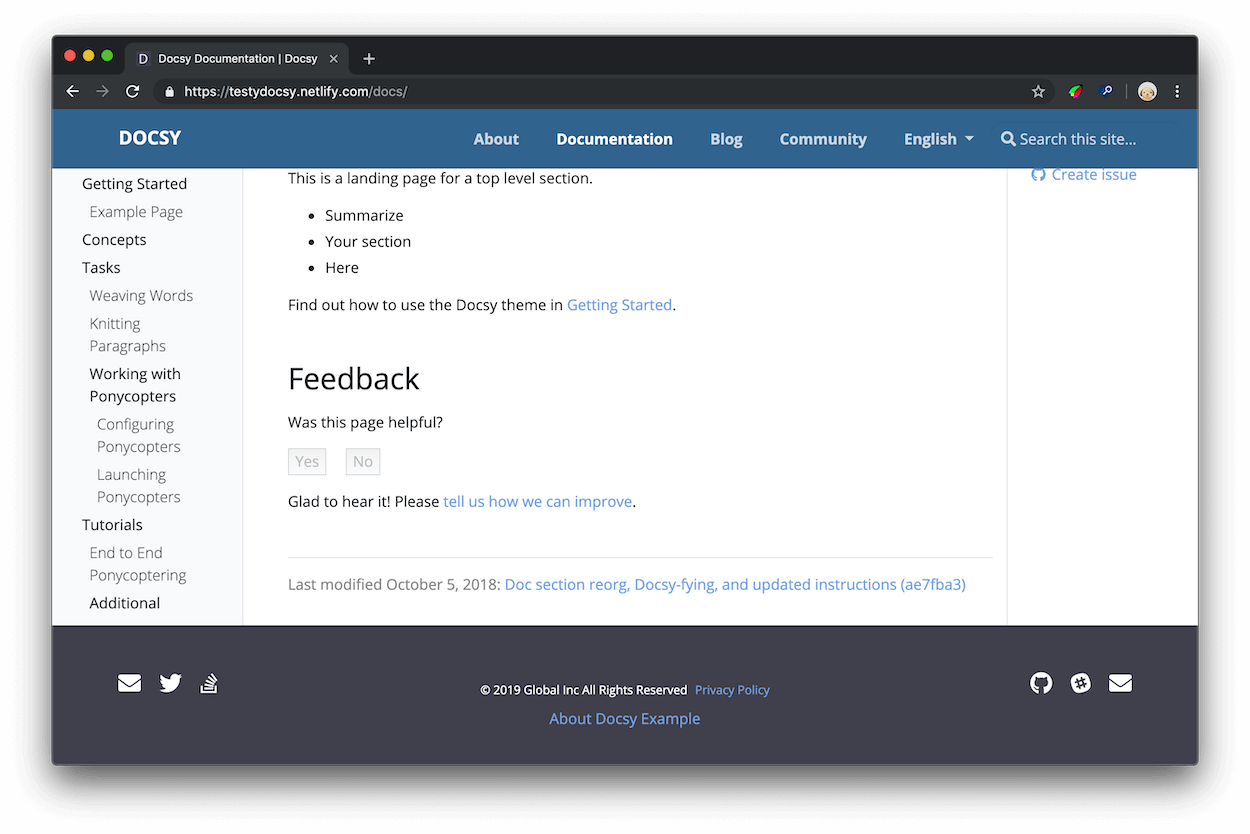
After clicking **Yes** the user should see a response like Figure 2. You can
[configure] the response text in your project's [configuration file][].

<figure>
  <img src="/images/yes.png"
       alt="After clicking 'Yes' the widget responds with 'Glad to hear it!
            Please tell us how we can improve.' and the second sentence is a link which,
            when clicked, opens GitHub and lets the user create an issue on the
            documentation repository."/>
  <figcaption>
    Figure 2. An example <b>Yes</b> response
  </figcaption>
</figure>

### How is this data useful?

When you have a lot of documentation, and not enough time to update it all, you
can use the "was this page helpful?" feedback data to help you decide which
pages to prioritize. In general, start with the pages with a lot of pageviews
and low ratings. "Low ratings" in this context means the pages where users are
clicking **No** --- the page wasn't helpful --- more often than **Yes** --- the
page was helpful. You can also study your highly-rated pages to develop
hypotheses around why your users find them helpful.

In general, you can develop more certainty around what patterns your users find
helpful or unhelpful if you introduce isolated changes in your documentation
whenever possible. For example, suppose that you find a tutorial that no longer
matches the product. You update the instructions, check back in a month, and the
score has improved. You now have a correlation between up-to-date instructions
and higher ratings. Or, suppose you study your highly-rated pages and discover
that they all start with code samples. You find 10 other pages with their code
samples at the bottom, move the samples to the top, and discover that each
page's score has improved. Since this was the only change you introduced on each
page, it's more reasonable to believe that your users find code samples at the
top of pages helpful. The scientific method, applied to technical writing, in
other words!

### Setup {#user-feedback-setup}

> [!WARNING] Version note
>
> As of Docsy version [0.8.0], feedback will be enabled whether
> `site.Config.Services.GoogleAnalytics.ID` is set or not. This supports the use
> case where analytics is configured outside of Docsy.

<!-- markdownlint-disable -->
<!-- prettier-ignore-start -->

1.  Open your project's Hugo configuration file.
2.  Set the response text that users see after clicking **Yes** or **No**.


   <ul class="nav nav-tabs" id="tabs-0" role="tablist">
  <li class="nav-item">
      <button class="nav-link disabled"
          id="tabs-00-00-tab" data-bs-toggle="tab" data-bs-target="#tabs-00-00" role="tab"
          aria-controls="tabs-00-00" aria-selected="false">
        Configuration file:
      </button>
    </li><li class="nav-item">
      <button class="nav-link active"
          id="tabs-00-01-tab" data-bs-toggle="tab" data-bs-target="#tabs-00-01" role="tab"
          data-td-tp-persist="toml" aria-controls="tabs-00-01" aria-selected="true">
        hugo.toml
      </button>
    </li><li class="nav-item">
      <button class="nav-link"
          id="tabs-00-02-tab" data-bs-toggle="tab" data-bs-target="#tabs-00-02" role="tab"
          data-td-tp-persist="yaml" aria-controls="tabs-00-02" aria-selected="false">
        hugo.yaml
      </button>
    </li><li class="nav-item">
      <button class="nav-link"
          id="tabs-00-03-tab" data-bs-toggle="tab" data-bs-target="#tabs-00-03" role="tab"
          data-td-tp-persist="json" aria-controls="tabs-00-03" aria-selected="false">
        hugo.json
      </button>
    </li>
</ul>

<div class="tab-content" id="tabs-0-content">
    <div class="tab-body tab-pane fade"
        id="tabs-00-00" role="tabpanel" aria-labelled-by="tabs-00-00-tab" tabindex="0">
        
    </div>
    <div class="tab-body tab-pane fade show active"
        id="tabs-00-01" role="tabpanel" aria-labelled-by="tabs-00-01-tab" tabindex="0">
        <div class="highlight"><pre tabindex="0" class="chroma"><code class="language-toml" data-lang="toml"><span class="line"><span class="cl"><span class="p">[</span><span class="nx">params</span><span class="p">.</span><span class="nx">ui</span><span class="p">.</span><span class="nx">feedback</span><span class="p">]</span>
</span></span><span class="line"><span class="cl"><span class="nx">enable</span> <span class="p">=</span> <span class="kc">true</span>
</span></span><span class="line"><span class="cl"><span class="nx">yes</span> <span class="p">=</span> <span class="s1">&#39;Glad to hear it! Please &lt;a href=&#34;https://github.com/USERNAME/REPOSITORY/issues/new&#34;&gt;tell us how we can improve&lt;/a&gt;.&#39;</span>
</span></span><span class="line"><span class="cl"><span class="nx">no</span> <span class="p">=</span> <span class="s1">&#39;Sorry to hear that. Please &lt;a href=&#34;https://github.com/USERNAME/REPOSITORY/issues/new&#34;&gt;tell us how we can improve&lt;/a&gt;.&#39;</span>
</span></span></code></pre></div>
    </div>
    <div class="tab-body tab-pane fade"
        id="tabs-00-02" role="tabpanel" aria-labelled-by="tabs-00-02-tab" tabindex="0">
        <div class="highlight"><pre tabindex="0" class="chroma"><code class="language-yaml" data-lang="yaml"><span class="line"><span class="cl"><span class="nt">params</span><span class="p">:</span><span class="w">
</span></span></span><span class="line"><span class="cl"><span class="w">  </span><span class="nt">ui</span><span class="p">:</span><span class="w">
</span></span></span><span class="line"><span class="cl"><span class="w">    </span><span class="nt">feedback</span><span class="p">:</span><span class="w">
</span></span></span><span class="line"><span class="cl"><span class="w">      </span><span class="nt">enable</span><span class="p">:</span><span class="w"> </span><span class="kc">true</span><span class="w">
</span></span></span><span class="line"><span class="cl"><span class="w">      </span><span class="nt">yes</span><span class="p">:</span><span class="w"> </span><span class="p">&gt;-</span><span class="sd">
</span></span></span><span class="line"><span class="cl"><span class="sd">        Glad to hear it! Please &lt;a
</span></span></span><span class="line"><span class="cl"><span class="sd">        href=&#34;https://github.com/USERNAME/REPOSITORY/issues/new&#34;&gt; tell us how we
</span></span></span><span class="line"><span class="cl"><span class="sd">        can improve&lt;/a&gt;.</span><span class="w">
</span></span></span><span class="line"><span class="cl"><span class="w">      </span><span class="nt">no</span><span class="p">:</span><span class="w"> </span><span class="p">&gt;-</span><span class="sd">
</span></span></span><span class="line"><span class="cl"><span class="sd">        Sorry to hear that. Please &lt;a
</span></span></span><span class="line"><span class="cl"><span class="sd">        href=&#34;https://github.com/USERNAME/REPOSITORY/issues/new&#34;&gt; tell us how we
</span></span></span><span class="line"><span class="cl"><span class="sd">        can improve&lt;/a&gt;.</span><span class="w">
</span></span></span></code></pre></div>
    </div>
    <div class="tab-body tab-pane fade"
        id="tabs-00-03" role="tabpanel" aria-labelled-by="tabs-00-03-tab" tabindex="0">
        <div class="highlight"><pre tabindex="0" class="chroma"><code class="language-json" data-lang="json"><span class="line"><span class="cl"><span class="p">{</span>
</span></span><span class="line"><span class="cl">  <span class="nt">&#34;params&#34;</span><span class="p">:</span> <span class="p">{</span>
</span></span><span class="line"><span class="cl">    <span class="nt">&#34;ui&#34;</span><span class="p">:</span> <span class="p">{</span>
</span></span><span class="line"><span class="cl">      <span class="nt">&#34;feedback&#34;</span><span class="p">:</span> <span class="p">{</span>
</span></span><span class="line"><span class="cl">        <span class="nt">&#34;enable&#34;</span><span class="p">:</span> <span class="kc">true</span><span class="p">,</span>
</span></span><span class="line"><span class="cl">        <span class="nt">&#34;yes&#34;</span><span class="p">:</span> <span class="s2">&#34;Glad to hear it! Please &lt;a href=\&#34;https://github.com/USERNAME/REPOSITORY/issues/new\&#34;&gt; tell us how we can improve&lt;/a&gt;.&#34;</span><span class="p">,</span>
</span></span><span class="line"><span class="cl">        <span class="nt">&#34;no&#34;</span><span class="p">:</span> <span class="s2">&#34;Sorry to hear that. Please &lt;a href=\&#34;https://github.com/USERNAME/REPOSITORY/issues/new\&#34;&gt; tell us how we can improve&lt;/a&gt;.&#34;</span>
</span></span><span class="line"><span class="cl">      <span class="p">}</span>
</span></span><span class="line"><span class="cl">    <span class="p">}</span>
</span></span><span class="line"><span class="cl">  <span class="p">}</span>
</span></span><span class="line"><span class="cl"><span class="p">}</span>
</span></span></code></pre></div>
    </div>
</div>


3.  Save the edits to your configuration file.

<!-- markdownlint-restore -->

By default, Docsy emits an event value of 100 when a user clicks "yes". You can
change this value by setting `params.ui.feedback.max_value` to a positive
integer. Docsy uses 0 for "no" events.

### Access the feedback data

Page feedback is reported to Google Analytics through [events].

> [!WARNING] Version note
>
> As of Docsy version [0.8.0], page feedback is reported as custom
> `page_helpful` events, rather than `click` events.

This section assumes basic familiarity with Google Analytics. For example, you
should know how to check pageviews over a certain time range and navigate
between accounts if you have access to multiple documentation sites.

1. Open Google Analytics.
2. Open **Reports** > **Engagement** > **Events**.
3. Click **page_helpful** in the events table. If there is no `page_helpful`
   event, then none have been registered for the selected period. Adjust the
   period as necessary.

Note that you might be required to create a custom report if you'd like to
better visualize individual data points (per page) along with average values.

[events]: https://support.google.com/analytics/answer/9322688

### Disable feedback on a single page

Add the parameter `hide_feedback` to the page's front matter and set it to
`true`.

 
   <ul class="nav nav-tabs" id="tabs-1" role="tablist">
  <li class="nav-item">
      <button class="nav-link disabled"
          id="tabs-01-00-tab" data-bs-toggle="tab" data-bs-target="#tabs-01-00" role="tab"
          aria-controls="tabs-01-00" aria-selected="false">
        Front matter:
      </button>
    </li><li class="nav-item">
      <button class="nav-link active"
          id="tabs-01-01-tab" data-bs-toggle="tab" data-bs-target="#tabs-01-01" role="tab"
          data-td-tp-persist="toml" aria-controls="tabs-01-01" aria-selected="true">
        toml
      </button>
    </li><li class="nav-item">
      <button class="nav-link"
          id="tabs-01-02-tab" data-bs-toggle="tab" data-bs-target="#tabs-01-02" role="tab"
          data-td-tp-persist="yaml" aria-controls="tabs-01-02" aria-selected="false">
        yaml
      </button>
    </li><li class="nav-item">
      <button class="nav-link"
          id="tabs-01-03-tab" data-bs-toggle="tab" data-bs-target="#tabs-01-03" role="tab"
          data-td-tp-persist="json" aria-controls="tabs-01-03" aria-selected="false">
        json
      </button>
    </li>
</ul>

<div class="tab-content" id="tabs-1-content">
    <div class="tab-body tab-pane fade"
        id="tabs-01-00" role="tabpanel" aria-labelled-by="tabs-01-00-tab" tabindex="1">
        
    </div>
    <div class="tab-body tab-pane fade show active"
        id="tabs-01-01" role="tabpanel" aria-labelled-by="tabs-01-01-tab" tabindex="1">
        <div class="highlight"><pre tabindex="0" class="chroma"><code class="language-toml" data-lang="toml"><span class="line"><span class="cl"><span class="err">+++</span>
</span></span><span class="line"><span class="cl"><span class="nx">hide_feedback</span> <span class="p">=</span> <span class="kc">true</span>
</span></span><span class="line"><span class="cl"><span class="err">+++</span>
</span></span></code></pre></div>
    </div>
    <div class="tab-body tab-pane fade"
        id="tabs-01-02" role="tabpanel" aria-labelled-by="tabs-01-02-tab" tabindex="1">
        <div class="highlight"><pre tabindex="0" class="chroma"><code class="language-yaml" data-lang="yaml"><span class="line"><span class="cl"><span class="nn">---</span><span class="w">
</span></span></span><span class="line"><span class="cl"><span class="nt">hide_feedback</span><span class="p">:</span><span class="w"> </span><span class="kc">true</span><span class="w">
</span></span></span><span class="line"><span class="cl"><span class="nn">---</span><span class="w">
</span></span></span></code></pre></div>
    </div>
    <div class="tab-body tab-pane fade"
        id="tabs-01-03" role="tabpanel" aria-labelled-by="tabs-01-03-tab" tabindex="1">
        <div class="highlight"><pre tabindex="0" class="chroma"><code class="language-json" data-lang="json"><span class="line"><span class="cl"><span class="p">{</span>
</span></span><span class="line"><span class="cl">  <span class="nt">&#34;hide_feedback&#34;</span><span class="p">:</span> <span class="kc">true</span>
</span></span><span class="line"><span class="cl"><span class="p">}</span>
</span></span></code></pre></div>
    </div>
</div>


### Disable feedback on all pages

Set `params.ui.feedback.enable` to `false` in
`hugo.toml`/`hugo.yaml`/`hugo.json`:


   <ul class="nav nav-tabs" id="tabs-2" role="tablist">
  <li class="nav-item">
      <button class="nav-link disabled"
          id="tabs-02-00-tab" data-bs-toggle="tab" data-bs-target="#tabs-02-00" role="tab"
          aria-controls="tabs-02-00" aria-selected="false">
        Configuration file:
      </button>
    </li><li class="nav-item">
      <button class="nav-link active"
          id="tabs-02-01-tab" data-bs-toggle="tab" data-bs-target="#tabs-02-01" role="tab"
          data-td-tp-persist="toml" aria-controls="tabs-02-01" aria-selected="true">
        hugo.toml
      </button>
    </li><li class="nav-item">
      <button class="nav-link"
          id="tabs-02-02-tab" data-bs-toggle="tab" data-bs-target="#tabs-02-02" role="tab"
          data-td-tp-persist="yaml" aria-controls="tabs-02-02" aria-selected="false">
        hugo.yaml
      </button>
    </li><li class="nav-item">
      <button class="nav-link"
          id="tabs-02-03-tab" data-bs-toggle="tab" data-bs-target="#tabs-02-03" role="tab"
          data-td-tp-persist="json" aria-controls="tabs-02-03" aria-selected="false">
        hugo.json
      </button>
    </li>
</ul>

<div class="tab-content" id="tabs-2-content">
    <div class="tab-body tab-pane fade"
        id="tabs-02-00" role="tabpanel" aria-labelled-by="tabs-02-00-tab" tabindex="2">
        
    </div>
    <div class="tab-body tab-pane fade show active"
        id="tabs-02-01" role="tabpanel" aria-labelled-by="tabs-02-01-tab" tabindex="2">
        <div class="highlight"><pre tabindex="0" class="chroma"><code class="language-toml" data-lang="toml"><span class="line"><span class="cl"><span class="p">[</span><span class="nx">params</span><span class="p">.</span><span class="nx">ui</span><span class="p">.</span><span class="nx">feedback</span><span class="p">]</span>
</span></span><span class="line"><span class="cl"><span class="nx">enable</span> <span class="p">=</span> <span class="kc">false</span>
</span></span></code></pre></div>
    </div>
    <div class="tab-body tab-pane fade"
        id="tabs-02-02" role="tabpanel" aria-labelled-by="tabs-02-02-tab" tabindex="2">
        <div class="highlight"><pre tabindex="0" class="chroma"><code class="language-yaml" data-lang="yaml"><span class="line"><span class="cl"><span class="nt">params</span><span class="p">:</span><span class="w">
</span></span></span><span class="line"><span class="cl"><span class="w">  </span><span class="nt">ui</span><span class="p">:</span><span class="w">
</span></span></span><span class="line"><span class="cl"><span class="w">    </span><span class="nt">feedback</span><span class="p">:</span><span class="w">
</span></span></span><span class="line"><span class="cl"><span class="w">      </span><span class="nt">enable</span><span class="p">:</span><span class="w"> </span><span class="kc">false</span><span class="w">
</span></span></span></code></pre></div>
    </div>
    <div class="tab-body tab-pane fade"
        id="tabs-02-03" role="tabpanel" aria-labelled-by="tabs-02-03-tab" tabindex="2">
        <div class="highlight"><pre tabindex="0" class="chroma"><code class="language-json" data-lang="json"><span class="line"><span class="cl"><span class="p">{</span>
</span></span><span class="line"><span class="cl">  <span class="nt">&#34;params&#34;</span><span class="p">:</span> <span class="p">{</span>
</span></span><span class="line"><span class="cl">    <span class="nt">&#34;ui&#34;</span><span class="p">:</span> <span class="p">{</span>
</span></span><span class="line"><span class="cl">      <span class="nt">&#34;feedback&#34;</span><span class="p">:</span> <span class="p">{</span>
</span></span><span class="line"><span class="cl">        <span class="nt">&#34;enable&#34;</span><span class="p">:</span> <span class="kc">false</span>
</span></span><span class="line"><span class="cl">      <span class="p">}</span>
</span></span><span class="line"><span class="cl">    <span class="p">}</span>
</span></span><span class="line"><span class="cl">  <span class="p">}</span>
</span></span><span class="line"><span class="cl"><span class="p">}</span>
</span></span></code></pre></div>
    </div>
</div>


## Add a contact form with Fabform

You can create a contact form for your site and collect your form submissions at
[fabform.io](https://fabform.io). To use this feature, you first need to sign up
for an account with Fabform. The following example shows how to add a simple
form that collects the user's email address to your site source:

```html
<form action="https://fabform.io/f/{form-id}" method="post">
  <label for="email">Your Email</label>
  <input name="email" type="email" />
  <button type="submit">Submit</button>
</form>
```

## Search Engine Optimization meta tags

To learn how to optimize your site for SEO, see
[Search Engine Optimization (SEO) Starter Guide](https://developers.google.com/search/docs/beginner/seo-starter-guide).

Google
[recommends](https://developers.google.com/search/docs/beginner/seo-starter-guide?hl=en%2F#descriptionmeta)
using the `description` meta tag to tell search engines what your page is about.
For each generated page, Docsy will set the content of the meta `description` by
using the first of the following that is defined:

- The page `description`
  [front matter field](/docs/content/adding-content/#page-front-matter)
- For non-index pages, the page [summary][], as computed by Hugo
- The site description taken from the [site `params`][]

For the code used to perform this computation, see [page-description.html].

Add more meta tags as needed to your project's copy of the `head-end.html`
partial. For details, see
[Customizing templates](lookandfeel/#customizing-templates).

[0.8.0]: /project/about/changelog/#v0.8.0
[Configure Google Analytics]:
  https://gohugo.io/templates/embedded/#configure-google-analytics
[ga4-intro]: https://support.google.com/analytics/answer/1042508
[Google Analytics]: https://analytics.google.com/analytics/web/
[hugo-ga]: https://gohugo.io/templates/embedded/#google-analytics
[embedded templates]: https://gohugo.io/templates/embedded/
[page-description.html]:
  https://github.com/google/docsy/blob/main/layouts/_partials/page-description.html
[site `params`]: https://gohugo.io/variables/site/#the-siteparams-variable
[summary]: https://gohugo.io/content-management/summaries/
[configure]: #setup
[configuration file]:
  https://gohugo.io/getting-started/configuration/#configuration-file